Introducing Rasterize: A Bold Script Font for Modern Web Design
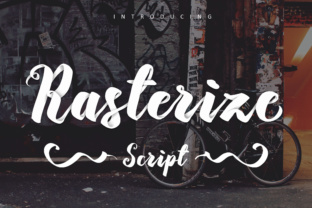
As a web designer, I recently had the opportunity to test Rasterize Script Bold in a real website project. This unique brush script, created by Darwinoo, brings a fresh and dynamic feel to any digital layout. The font's speed motion technique gives it a distinctive, almost hand-drawn quality that can add a personal touch to a wide range of web designs.
A Real-World Test: Using Rasterize in a Creative Portfolio
I decided to use Rasterize in the hero section of a creative portfolio site. The goal was to create a visually appealing and engaging first impression. The bold, flowing lines of Rasterize immediately caught the eye, making the name and tagline stand out. The result was a vibrant, energetic look that perfectly matched the portfolio's artistic and modern aesthetic.
Visual Characteristics and Personality
Rasterize Script Bold is not just another script font. Its 400 unique glyphs provide a rich set of characters, including alternates and ligatures, which add to its versatility. The font's personality is both bold and playful, making it ideal for projects that need a touch of creativity and flair. The speed motion technique used in its creation gives it a lively, almost animated feel, perfect for adding a dynamic element to static web pages.
Readability and Visual Hierarchy
While Rasterize is highly decorative, it still maintains good readability, especially when used in larger sizes. For smaller text, such as body copy, I paired Rasterize with a clean, simple sans serif font like Roboto. This combination ensures that the overall design remains legible and user-friendly. In the portfolio site, I used Rasterize for the main headings and subheadings, while the body text was in Roboto, creating a clear visual hierarchy.
Using Rasterize in Different Sections
- Hero Titles: Rasterize works exceptionally well for hero titles, where its bold and expressive style can make a strong impact.
- Section Headings: It can also be used for section headings, adding a touch of personality and breaking up the monotony of more traditional fonts.
- Call-to-Action Areas: For CTAs, Rasterize can be used in short, impactful phrases, drawing the user's attention and encouraging interaction.
- Logo Text and Decorative Accents: The font's unique character makes it suitable for logo text and decorative elements, enhancing the brand's visual identity.
Responsive Design and Mobile Readability
One of the key considerations in web design is how a font performs on different devices, especially mobile screens. Rasterize, with its bold and clear lines, holds up well on smaller screens. However, for very small text or buttons, it's best to use a simpler, more legible font. In the portfolio site, I tested Rasterize on various devices and found that it maintained its appeal and readability across all screen sizes.
Font Pairing and Brand Consistency
Pairing Rasterize with other fonts is crucial for maintaining a balanced and professional look. I recommend using a clean, sans serif font for body text and a classic serif font for more editorial content. This combination ensures that the overall design is consistent and polished. For example, in a coaching website, Rasterize could be used for the main headings and callouts, while a serif font like Merriweather could be used for the body text, creating a harmonious and sophisticated look.
Practical Tips for Using Rasterize
- Check Included Styles: Before using Rasterize, explore the included styles and weights to find the one that best fits your project.
- Webfont Availability: Ensure that the font is available in webfont formats (e.e., WOFF, WOFF2) for optimal performance on the web.
- Multilingual Support: If your project requires multiple languages, check if Rasterize supports the necessary character sets.
- Commercial Licensing: Always verify the commercial licensing terms, especially if you plan to use the font for client projects or online stores.
Conclusion
Rasterize Script Bold is a versatile and visually striking font that can elevate the design of any website. Whether you're working on a creative portfolio, a boutique online store, or a coaching website, Rasterize offers a unique and expressive way to enhance your brand's visual identity. By carefully considering its use in different sections and pairing it with complementary fonts, you can create a cohesive and engaging web experience that resonates with your audience.